
 News
News
 Shopify SEO
 Shopify development
Best Reordering Shopify apps in 2027 [Updated]


PickYourApp Review Team
6 min read
•
Aug 21, 2026
The best Shopify reordering apps make it simple for customers to place repeat orders and manage their purchases independently. These essential tools enable one-click reordering, custom replenishment reminders, and self-service order management capabilities. From instant order repeats to customer-defined reorder schedules, these apps help merchants reduce support workload while improving the shopping experience. Whether your store needs basic reordering functionality or advanced order management features, these top-rated solutions streamline the repurchasing process for both merchants and their customers.
| Name | Rate on Shopify | Price | Free trial | Key features |
|---|
-
#1. Enable one-click reordering so customers can repeat orders and reorder past purchases easily.

 Many Shopify merchants lose sales when customers can't easily reorder products they've already bought. When shoppers struggle to repeat orders, they often abandon their purchase. This app solves the problem by adding a one-click reorder button on your thank you page, order status page, my account page, and other key locations. Customers can reorder past purchases with a simple popup on the legacy account page. The app lets you offer discount codes to encourage repeat orders from previous purchases. Shoppers can add notes when placing their repeat orders, and view past order details to make reordering more convenient. Set up reorder reminders to bring customers back. A straightforward solution to increase repeat purchases and drive more sales from existing customers.
 -
#2. Let customers edit, cancel and reorder on their own for a better customer experience.

 Give your customers the freedom to edit, cancel, and reorder their purchases without contacting support. Orderify adds a self-service customer portal to your order status pages, confirmation emails, and account section. Customers can easily modify unfulfilled orders or place one-click reorders, while automatic refunds and inventory restocking handle the backend processes. The app works seamlessly with all Shopify payment gateways and third-party fulfillment services. Setup takes just 5 minutes, letting you customize rules like editing time limits and display options. When customers edit orders, Orderify cancels the original purchase and moves items to the cart for modifications, ensuring a smooth shopping experience while reducing support workload.
 -
#3. The app allows customer to cancel order and reorder on their own, without contacting support
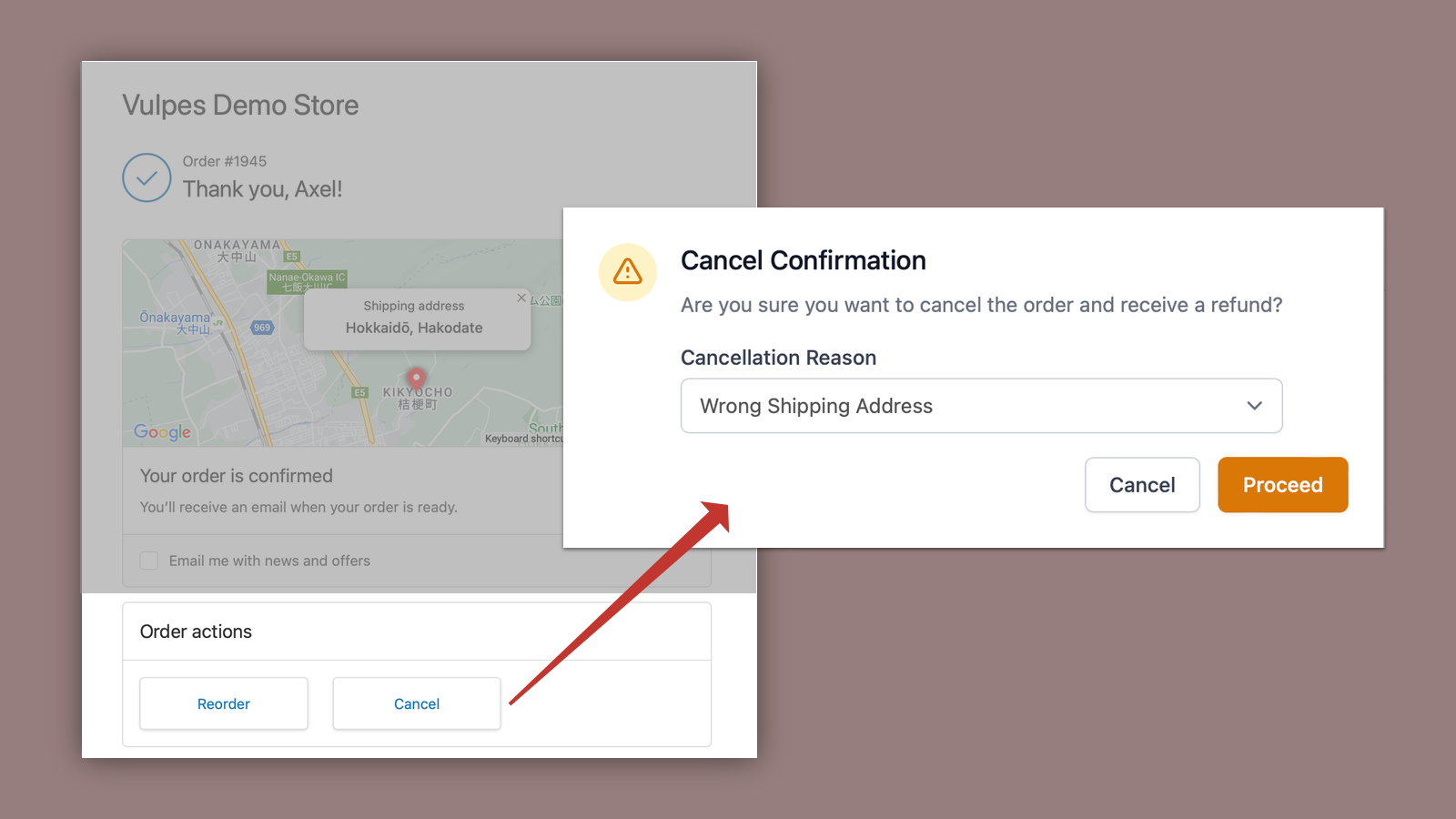
 Enable your customers to easily cancel and reorder purchases directly from their order status page, account dashboard, or confirmation email. This self-service order cancellation app reduces support workload while improving customer satisfaction. Customers can cancel orders with a single click within your set time limit and quickly reorder previous items without contacting support. Use the "cannot-cancel" tag to mark specific products or orders as non-cancellable. The app integrates seamlessly with your checkout and order status pages through app blocks, making order management simpler for both you and your customers. Prevent potential chargebacks by giving customers more control over their orders.
 -
#4. Reorder reminders that customers set themselves. Repeat revenue, without the subscription churn.
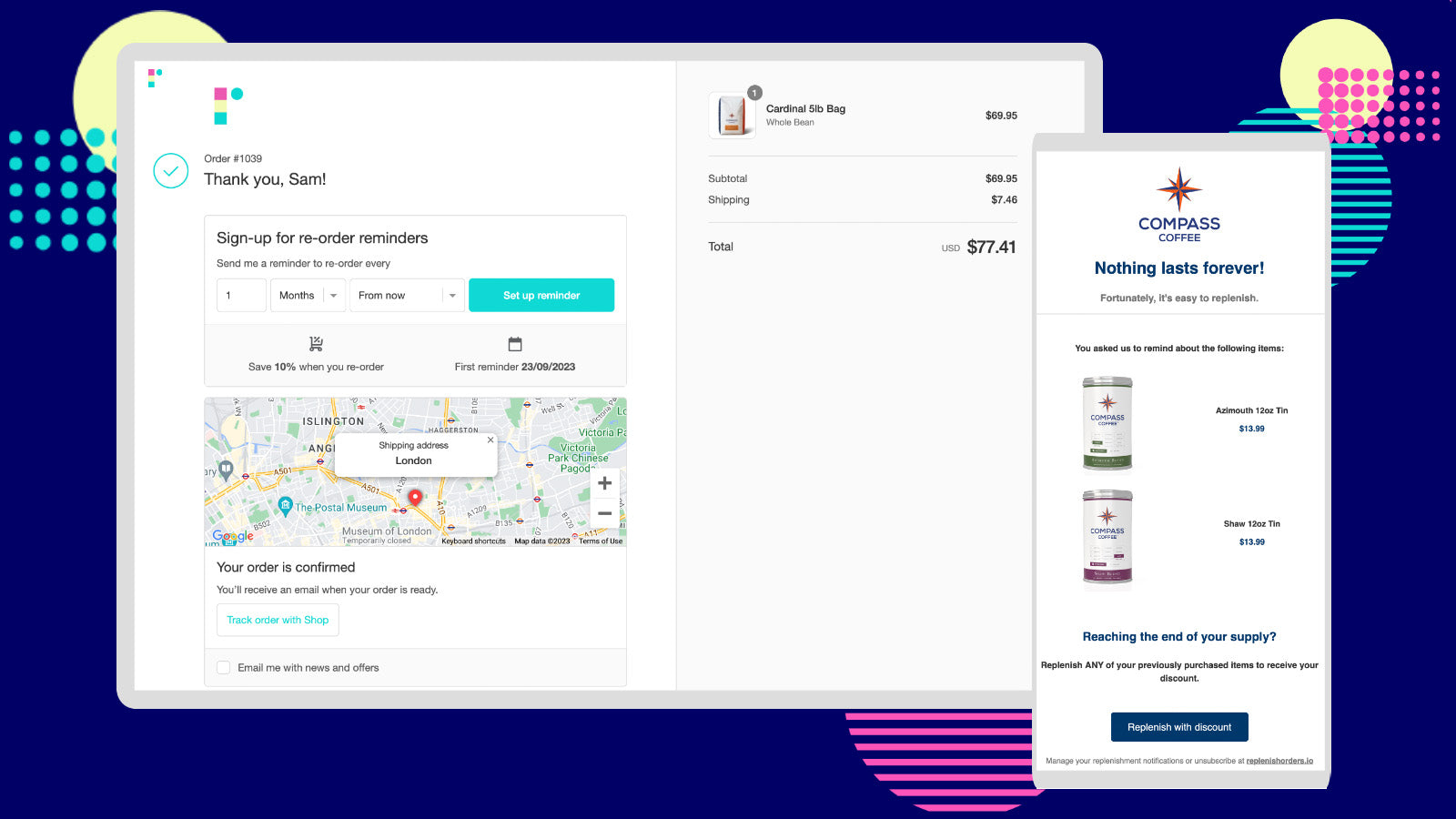
 Replenish helps you get repeat orders without subscription churn. Instead of forcing customers into subscriptions that lead to cancellations, failed payments, and support tickets, this app lets customers set their own reorder reminders based on how fast they use your products. Reminder emails include a pre-loaded checkout link so reordering takes just one click. You can add optional discounts to encourage repeat purchases. Customers control everything themselves - they can snooze, reschedule, or cancel reminders directly from the email, which means zero support load for your team. No stored card details, no failed payments, and no subscription cancellations to deal with. Just repeat revenue from customers who want to buy again on their own schedule. Perfect for consumable products where customers need reminders at the right moment to reorder.