
 News
News
 Shopify SEO
 Shopify development
Best alternatives for TP: True Profit Analytics Shopify app in 2027 [Updated]

TP: True Profit Analytics
From $35/month. Free trial available.
Instantly track your True Profit. Sync costs & report on Net profit, profit & loss, LTV, profit calc
Compare with % app %| Name | Rate on Shopify | Price | Free trial | Key features |
|---|
-
#1. Build custom reports, automate reports & analytics, and reconcile data from key integrations easily

 Report Pundit is an advanced custom reports and analytics tool that helps you build unlimited detail reports and dashboards for your Shopify store. Choose from 150+ pre-built reports covering sales, tax, payouts, profit, fulfillment, customers, markets, POS, and inventory. Customize reports with filters, calculated columns, custom metrics, and API fields. Access data from metafields, tags, and line-item properties. Get automated custom email reports that save you hours of manual work. Live human support helps build your custom reports instantly. Multi-store reporting gives you one view across stores, markets, and currencies. Export and schedule reports to Excel, CSV, PDF, Slack, and Google Sheets. Includes payout reconciliation and free customization to match your exact needs.
 -
#2. Prebuilt and Custom Reports to Automate Repetitive and Frustrating Data Tasks

 Data Export IO: Reports helps you automate repetitive data tasks with prebuilt and custom reports for your Shopify store. Access instant reports to analyze sales, inventory, shipping, fulfillment, payouts, tax, customers, refunds and more. Build custom reports using meta fields, line item properties, note attributes and any field from your store API. Add calculations and formulas for unique data analysis. Save, edit and rerun unlimited reports whenever needed. Schedule automated reports in multiple formats including Sheets, Excel, CSV, JSON, or TXT. Send reports automatically to email, FTP, drive or Google Sheets. Choose from editable report templates covering sales, marketing, inventory and all store operations. Need help? Get one-click setup assistance for your reports.
 -
#3. Powerful reporting & analytics. Explore your data and automate reports. Custom report service.
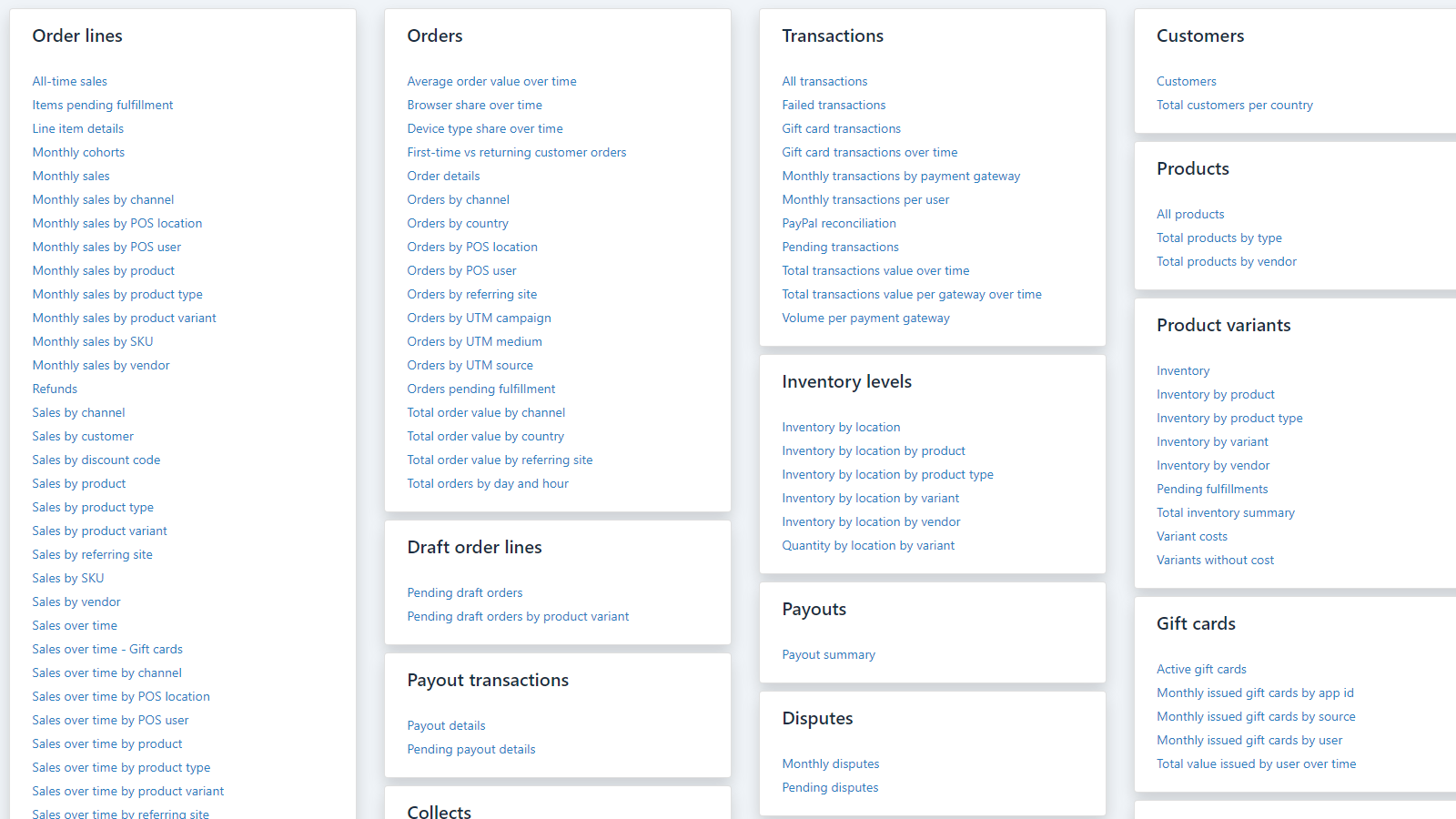
 Get detailed insights into your store's performance with comprehensive reporting and analytics. Explore sales, payments, inventory, customer data, and payouts using pre-built or custom reports. Create personalized reports with custom fields, metrics, and formulas to analyze your data exactly how you need it. Share reports easily by exporting to PDF, Excel, CSV, or Google Sheets. Set up automated email delivery to keep your team informed. The app includes POS reporting, multi-store analytics, and multi-currency support. Need help? Their custom report service will build reports tailored to your requirements. Access advanced features like tag analysis, metafield tracking, and multiple chart visualizations to understand your business better. Whether you're monitoring daily operations or planning long-term strategy, BR - Better Reports gives you the data analysis tools you need.
 -
#4. Better reports: sales reports, inventory reports, email reports. Data export to Google Sheets.


Mipler ‑ Advanced Reports
Free plan available | Free trial availableMipler is an advanced analytics and reporting app for Shopify stores. Build custom reports from orders, products, inventory, line items, metafields and tags. Get detailed sales reports, tax reports, payout reports, refund reports, discount reports, VAT reports, and COGS profit reports in minutes. Create financial reports and accounting reports for your business needs. Schedule automated Excel and PDF reports delivered directly to your team's inbox - no Shopify admin access required. Share order reports and product reports through secure links. Report by delivery date, tag groups, or subscription counts. Export data to Google Sheets for further analysis. Connect AI analytics with Claude or ChatGPT via MCP to ask questions about your store data in any language. Perfect for store analytics, fulfillment reports, and inventory tracking. -
#5. Post-purchase, exit-intent, email & SMS surveys. See how shoppers found you and why they buy.

 Zigpoll Customer Surveys helps you run post-purchase surveys on thank-you and order status pages, plus exit-intent surveys, product page surveys, email and SMS surveys, and Shopify POS surveys. Ask "How did you hear about us?" to track marketing channels and compare revenue and AOV alongside Meta Ads Manager and GA4. Collect zero-party data, measure NPS and CSAT, and discover why visitors don't buy. AI automatically sorts open-ended customer feedback into themes and delivers weekly insight reports. Sync survey answers to Klaviyo, Shopify Flow, and Google Sheets, or access them via API and MCP for custom integrations.
 -
#6. Add interactive dealer map & physical stockist location to any store page.

 TA MAPPY helps you add a store locator and interactive dealer map to your Shopify store. Add unlimited physical stockist locations individually or through bulk CSV import. The app works with Google Maps, Mapbox, or OpenStreetMap without needing an API key. Customize your map templates to match your brand and use tags for easy search and filtering. Auto-detect customer locations based on IP address to show nearby stores and suggest directions. The AI assistant answers questions about your store locator settings and converts addresses into map coordinates. Create dealer forms to simplify the flow from storefront to backend with automated emails. Translate your store locator for international customers and track location insights with Search Records to understand how shoppers find your stores.
 -
#7. Stop losing sales: AI, replays, heatmaps, surveys & checkout recording optimize conversions fast

 Propel Replay helps Shopify stores recover lost sales through session recording, heatmaps, and AI-powered insights. Watch live and recorded session replays to see exactly where shoppers abandon cart and identify checkout friction. The AI Assistant analyzes customer behavior and flags conversion drops before they impact revenue. Heatmaps reveal ignored add-to-cart buttons and broken layouts, while on-site surveys explain why visitors didn't buy. Shopify Plus merchants can record checkout sessions for complete visibility. Detect bots and competitor clicks wasting your ad spend by tracking IP addresses and traffic sources. Trusted by 7,000+ stores for conversion rate optimization based on real shopper behavior. Installs in minutes with no coding required.
 -
#8. See What's Costing You Sales — Then Fix It with Session Replays, Heatmaps & AI

 Every abandoned cart tells a story — MIDA helps you understand exactly why shoppers leave. Watch real session recordings from first click to checkout and see where visitors hesitate or drop off. The AI Assistant analyzes visitor behavior and tells you what to fix first to improve conversions. Revenue heatmaps show which clicks actually make money and what's wasting space on your store. Track search queries, spot errors, and identify funnel drop-offs before they hurt sales. MIDA blocks bots, filters sessions, and gives you actionable insights to turn browsers into buyers and recover lost revenue.
 -
#9. Track Profit & Loss with custom reports & analytics, customer cohort reporting to CAC and LTV.

 Lifetimely gives brands accurate profit analytics and customer insights through advanced reporting built for smarter business decisions. Track profit and loss in real-time, understand lifetime value (LTV), and monitor customer acquisition cost (CAC) with automated dashboards. Get detailed cohort reports that break down revenue and profit trends by customer segment and marketing channel. Analyze product performance, customer journeys, and retention metrics all in one place. Custom reports combine your store and marketing data into clear P&L statements, LTV tracking, and sales forecasting. Integrations unify Shopify and Amazon data while AI-powered analytics reveal what drives growth. See which products attract new customers, monitor net profit metrics, and make data-driven decisions to scale profitably with comprehensive customer behavior insights and marketing analytics.
 -
#10. Precise, customizable reports and data exports. All your data, in any format, automatically!
 Unlock valuable insights from your Shopify store with customizable data exports and detailed reports. This app lets you access and format all your store data including metafields, line item properties, transactions, and payouts. Create precise reports using the intuitive editor, or start with pre-built templates to save time. Export your data in Excel, CSV, Text, or XML formats, and automate delivery through email or SFTP to keep teams, vendors, and systems updated. Set up custom calculations and filters using extended Liquid support for exactly the data you need. Need help perfecting your reports? The dedicated support team is available via phone, email, or chat to ensure you get the most from your data exports. Store your reports securely within the app or schedule automatic distributions to keep your business running smoothly.