
 News
News
 Shopify SEO
 Shopify development
Best Selling in person Shopify apps in 2027 [Updated]


| Name | Rate on Shopify | Price | Free trial | Key features |
|---|
-
#1. Scheduler & calendar widget for reservations, workshops, event booking, classes, rentals & ticketing

 BookX is a no-code appointment booking system for service-based businesses. Manage online booking for salons, spas, clinics, studios, restaurants, workshops, classes, and events. This booking app works like Eventbrite but integrates directly into your Shopify store. Create hourly, full-day, or multi-day appointments with capacity limits and booking deadlines. Set up rental booking, event ticketing, and hotel reservations with ease. The scheduler supports payment-less appointments for venues, courts, and courses. Manage team members and locations with unique schedules for each service. Add a calendar widget and booking form on any page without creating products. Block out holidays and send automatic reminders to customers. Integrate with Google Calendar, Google Meet, Zoom, and Klaviyo. Customers can reschedule and manage their reservations through a self-service dashboard. Perfect for doctor consultations, pet grooming, boutiques, webinars, and any business that needs appointment scheduling.
 -
#2. Retail Barcodes Generator & SKUs. Create and print perfect Retail Barcode Label Prints!
Generate professional barcode labels for your products with this easy-to-use app. Create retail barcodes instantly with one click for single or bulk products. Design custom branded label templates that match your store and print production-ready barcode labels without any technical skills. The app supports multiple barcode standards including EAN-8, EAN-13, Code128, UPC-A, and UPC-E. Works seamlessly with Zebra, Dymo, Brother, Rollo, and over 2000+ printer and paper brands for perfect label prints every time. Add product details like name, SKU, price, options, and tags to your barcode labels. Quickly identify products missing barcodes or SKUs. Perfect for inventory management across single or multiple locations. Compatible with any barcode scanner for easy scanning and efficient inventory tracking. -
#3. Add interactive dealer map & physical stockist location to any store page.

 TA MAPPY helps you add a store locator and interactive dealer map to your Shopify store. Add unlimited physical stockist locations individually or through bulk CSV import. The app works with Google Maps, Mapbox, or OpenStreetMap without needing an API key. Customize your map templates to match your brand and use tags for easy search and filtering. Auto-detect customer locations based on IP address to show nearby stores and suggest directions. The AI assistant answers questions about your store locator settings and converts addresses into map coordinates. Create dealer forms to simplify the flow from storefront to backend with automated emails. Translate your store locator for international customers and track location insights with Search Records to understand how shoppers find your stores.
 -
#4. The complete Stocky replacement: purchase orders, demand forecasting, stocktakes & low stock alerts

 EasyScan is a complete inventory management solution and barcode scanner app for Shopify that replaces Stocky. Generate custom SKUs and barcodes, then print retail labels with the built-in SKU generator and barcode printer. Forecast demand using sales velocity data to auto-create purchase orders with reorder suggestions. Manage stock across locations with transfer orders and receive POs efficiently. Get low stock alerts to prevent stockouts and run stocktakes by scanning products. Pick, pack, fulfill and check orders with barcode scanning to eliminate errors. Track bin locations and view detailed inventory reports including ABC analysis, dead stock identification, and stock valuation. One-click purchase orders make reordering simple.
 -
#5. Take unlimited appointments and bookings on your calendar. Booking app for any event or service.

 This booking app lets you create an appointment calendar for your Shopify store in minutes. Perfect for events, experiences, tastings, reservations, and group sessions—whether in-person or online. It works like an integrated Calendly for Shopify, syncing directly with your customers, orders, and POS system. Take unlimited free or paid appointments with features like multi-location scheduling, staff portal, deposits, waitlists, intake questions, and QR tickets. Send automated email and SMS reminders to reduce no-shows. Customers can easily reschedule their bookings themselves. The calendar widget is customizable with no coding required. Sync seamlessly with Google Calendar, Outlook, Zoom, Flow, and Klaviyo. Get advanced analytics per location and manage schedules, check-ins, and bookings with ease. Built specifically for wineries, jewelers, showrooms, and service-based businesses. All-day chat and email support included.
 -
#6. Easily create a powerful, customizable, mobile-friendly store & dealer locator map.
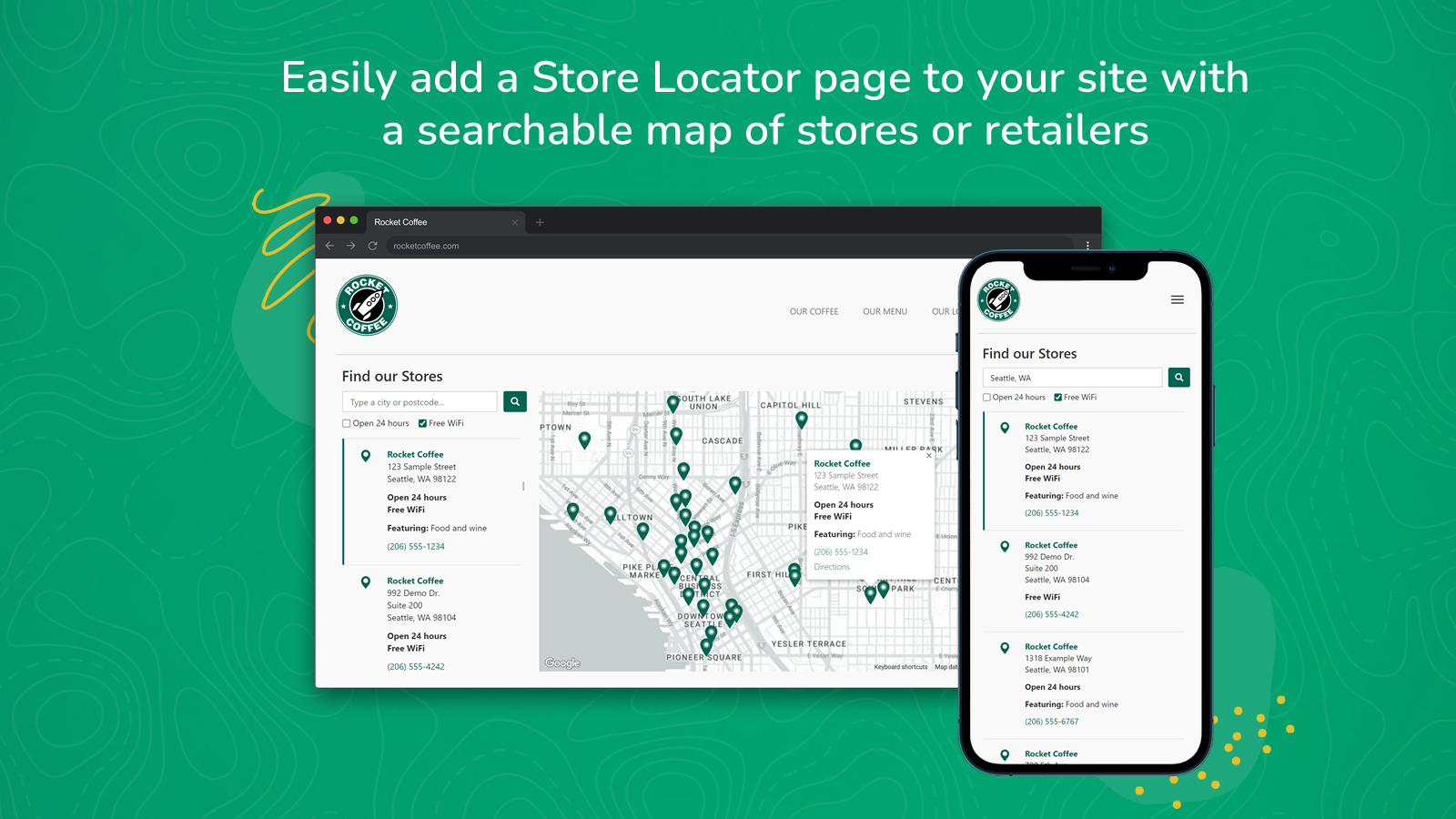
 Looking to add a professional store locator map to your Shopify site? Stockist helps you create a searchable, mobile-friendly map that showcases your retail locations, dealers, and stores. Customers can easily find nearby locations using geolocation, filter search results, and explore the map as they browse. Customize the look with your brand colors, adjust layouts, and manage locations through direct entry or spreadsheet imports. The built-in analytics reveal where customers are searching, helping you make informed decisions about your retail presence. Whether you have a few stores or hundreds of dealers, this store locator solution helps reduce customer support queries while building trust with your shoppers.
 -
#7. All-in-one retail team management: Time clock, payroll, scheduling, commissions, PTO & compliance.

 Easyteam POS Time Clock In is a staff management platform designed specifically for Shopify Point of Sale retail stores. Your team can clock in and out directly from POS or the mobile app, making time tracking simple across all locations. The app handles timesheets, employee scheduling, commissions, tips, PTO, and checklists all in one place. Run payroll through Easyteam Payroll or integrate with QBO, Gusto, ADP, and other providers. Store managers can set retail goals per location, track labor costs, monitor sales performance, and identify peak hours to plan staffing effectively. The platform keeps every store manager and deputy in sync while serving as a homebase for your retail team. New hires can onboard quickly with minimal training, and you can manage store checklists like opening procedures right from the POS.
 -
#8. Design and print barcodes label for your products in just 3 steps. SKU generator is quite simple

 Create professional barcode labels for your Shopify products with this user-friendly retail labeling solution. Design custom product labels that match your brand using various paper sizes and barcode formats - no coding needed. The app lets you print labels individually or in bulk using CSV files, and includes a simple SKU generator. Manage staff permissions and control label creation precisely. For added convenience, the app integrates with Stocky to print labels directly from Purchase Orders. Whether you need single product labels or batch printing, Yanet Retail Barcode Labels makes product labeling straightforward and professional.
 -
#9. Boost sales with an easy-to-set-up Wishlist for all customer touchpoints. Top integrations included.

 Wishlist Plus helps shoppers save their favorite products and come back to them later. The app supports multiple wishlists, making it easy for customers to organize items and share them through email, SMS, or social media. It works with anonymous wishlists too, so even guests can save products. The app integrates with leading email services to send automated alerts for price drops and restocks, helping you recover lost sales. It connects with Shopify POS so your sales staff can view customer wishlists in-store. You can customize the wishlist using Shopify Sidekick with simple AI prompts. Wishlist Plus reduces cart abandonment by letting shoppers save products for later. It includes detailed reports on shopper behavior and a Customer Accounts extension for tracking wishlists and browsing activity. The app comes with powerful APIs for advanced customization.
 -
#10. Generate Barcodes & SKUs. Create and print perfect Retail Barcode Labels for your needs!

 Create professional retail barcode labels quickly with this comprehensive labeling solution. Generate standard barcodes in multiple formats including GTIN, EAN, and UPC, plus custom SKUs that match your business needs. Design labels easily using the drag-and-drop interface, adding product details like names, prices, and options. Include QR codes and print on any label size using your preferred printer. The app works seamlessly with Stocky for convenient label printing directly from purchase orders and product pages. Perfect for retailers who need a reliable barcode and label printing system that integrates with their Shopify store.

