News
News
 Shopify SEO
 Shopify development
Best free Search and navigation - Other Shopify apps in 2027 [Updated]


PickYourApp Review Team
6 min read
•
Sep 13, 2026
The Best Free Shopify search and navigation apps help merchants build better shopping experiences without spending a dime. From smart related products and infinite scroll features to AI chatbots and mega menus, these tools make it easier for customers to find what they need. Essential functionalities include floating CTA buttons, mobile-friendly navigation bars, XML sitemaps, variant displays, and 404 error fixes - all designed to improve store navigation and keep shoppers engaged throughout their journey.
| Name | Rate on Shopify | Price | Free trial | Key features |
|---|
-
#1. A button allows the user to quickly return to the top of the page without making too much effort.

 Make your Shopify store more user-friendly with the Smooth Scroll To Top button. Perfect for stores with long product descriptions and content-rich pages, this button lets visitors instantly return to the top with a single click. The button appears only when scrolling is needed and includes a progress bar to help customers track their position on the page. You can easily customize the button's appearance - from colors and shapes to size and position - to match your store's design. Whether customers are browsing lengthy product catalogs or detailed blog posts, this scroll-to-top function improves navigation and helps create a better shopping experience. If your theme doesn't include this essential feature by default, Smooth Scroll To Top offers a simple solution to add professional scrolling functionality to your store.
 -
#2. Create Instagram like menu for your store and it helps in accessing different products in mobile
Create an Instagram-style Story menu for your mobile store that makes product navigation simple and engaging. This app displays circular menu icons, similar to Instagram Stories, allowing customers to quickly access your important product pages and catalogs. The Story menu appears only on mobile devices, keeping your desktop navigation clean and traditional. You can easily update and rearrange menu items with just a few clicks, giving you full control over your mobile navigation experience. Help your mobile customers find what they're looking for faster with this familiar, user-friendly menu format that mirrors the popular Instagram interface they already know and love. -
#3. Create floating navigation buttons that stay visible and turn customer attention into action.

 Floating Buttons lets you add sticky navigation buttons to your Shopify store that stay visible as customers browse. Create floating buttons for contact, chat, call, email, social media, or quick navigation links that catch attention and drive action. Customize icons, labels, colors, placement, and hover states to match your brand perfectly. Add multiple floating buttons and manage them all from one simple dashboard. Assign custom actions and links to each button, choose from the icon library or upload your own, and adjust backgrounds, borders, and hover effects. No coding needed—set up in minutes and guide visitors to support, promotions, or any action that matters most. Perfect for mobile-friendly navigation and improving customer experience.
 -
#4. Transform dropdowns into beautiful color & image swatches. Group products seamlessly.
Say goodbye to boring text dropdowns and showcase your product variants with beautiful color and image swatches. This app displays interactive swatches on both product pages and collection pages, helping shoppers see exactly what they're buying. The product groups feature lets you combine separate variant listings into unified swatches on a single page. Show variant prices directly on swatches to highlight price differences. Navigate multiple variants smoothly with the swatch slider functionality. Perfect for stores selling variants as separate products, this app keeps your catalog organized and makes browsing seamless. Get 24/7 live support for technical issues and setup questions. -
#5. Effortlessly return to the top with a single click. Enhance user navigation with ease.

 Navigate your online store with ease using this simple scroll to top button. The app lets users return to the top of any page with a single click, making browsing smoother and more convenient. The button smoothly integrates with your store's theme and can be customized to match your design preferences. Perfect for both desktop and mobile shoppers, it provides seamless scrolling functionality that improves the overall shopping experience. The app's user-friendly features help keep visitors engaged while browsing your store, making navigation frustration-free across all pages and products.
 -
#6. Connects products from and to Partly Apps
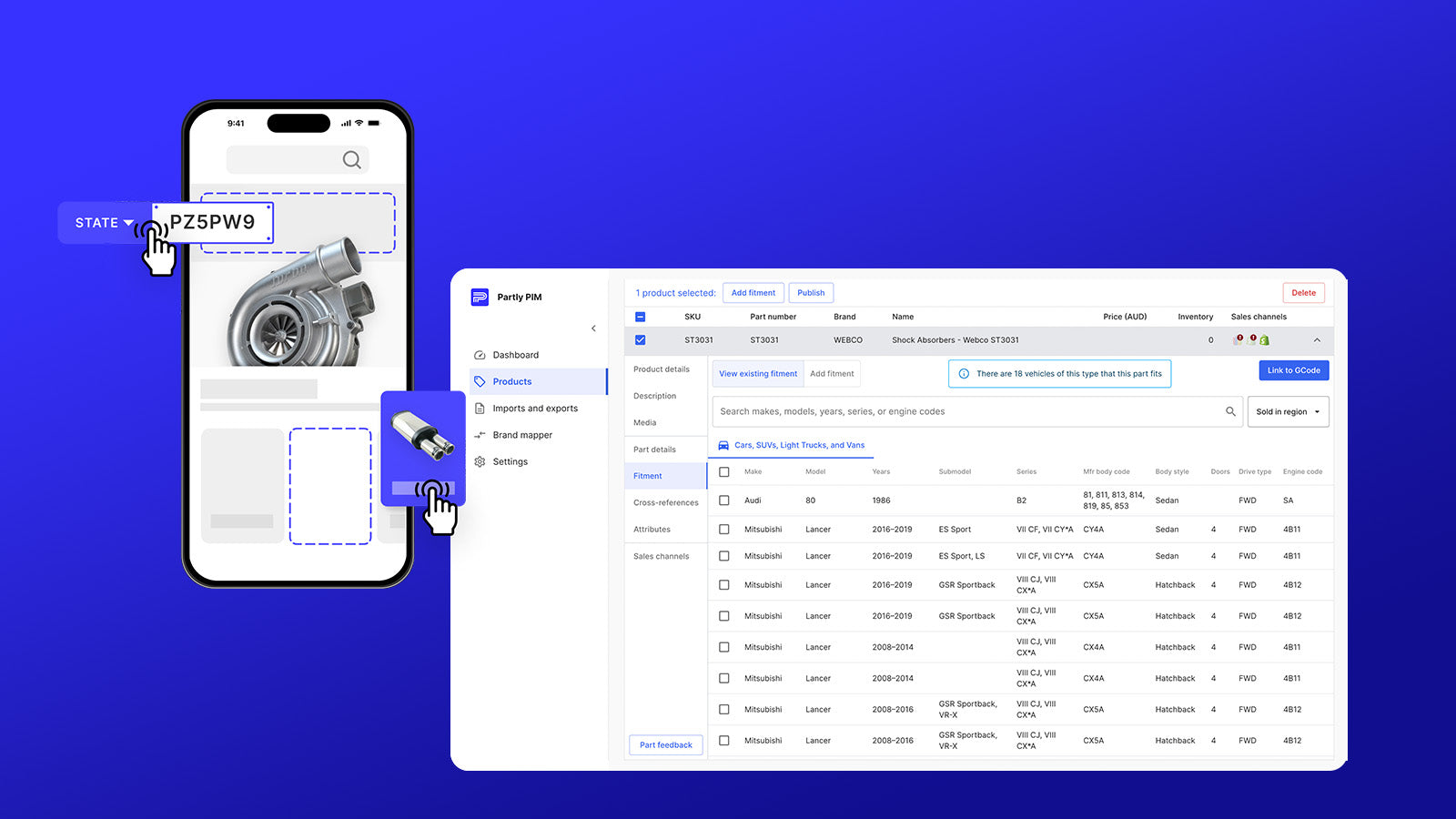
 The Partly Connector seamlessly integrates your Shopify store with Partly Apps, enabling two-way product synchronization. This integration keeps your product data accurate across both platforms by automatically syncing essential elements including product images, inventory levels, pricing, and descriptions. With built-in fitment management through Partly PIM and advanced vehicle search capabilities via Partly Storefront, the connector ensures your automotive parts catalog stays up-to-date and accessible. Whether you're managing inventory in Shopify or Partly, this connector maintains consistency and reduces manual updating work, making product management more efficient for automotive parts sellers.