News
News
 Shopify SEO
 Shopify development
Best free Checkout Shopify apps in 2027 [Updated]


| Name | Rate on Shopify | Price | Free trial | Key features |
|---|
-
#1. Validate checkout, add payment, shipping & discount rules, checkout blocks & post-purchase upsells
SMART Checkout Rules & Upsells gives merchants complete control over their checkout experience with flexible validation rules and customization options. Hide, block, sort, or rename payment methods and shipping options based on conditions like customer tags, country, cart value, products, or discount codes. Perfect for managing high-risk orders, blocking COD or specific payment methods like PayPal and Credit Card by customer criteria. Grow your average order value with one-click post-purchase upsells and downsells that appear after checkout. Add checkout blocks including banners and discount codes with conditional display rules. Apply checkout validation and discount logic based on cart total, customer tags, or delivery method. Ideal for B2B stores, international shipping flows, and merchants who need advanced checkout control without coding. Control your checkout rules and increase conversions with smarter upsell strategies. -
#2. Hide, sort & rename checkout payment methods based on rules like country, cart value, or shipping.
Take control of your Shopify checkout payment options with ETP Sort & Hide Payment Methods. Customize how payment methods appear by hiding, sorting, or renaming options like PayPal, credit cards, Cash on Delivery (COD), and manual payments. Create specific rules based on shopping cart value, shipping method, customer location, product SKUs, or customer tags. The app lets you show only relevant payment options to different customers without any coding needed. All changes apply instantly to your checkout, making it easier for customers to complete their purchase with their preferred payment method. -
#3. Grow via side cart drawer cart upsell, sticky add to cart bar, free shipping bar & slide cart upsell
This app helps grow your sales with a sticky add to cart bar that keeps the buy button always visible on your product pages. The side cart drawer lets customers view their cart instantly without leaving the page, while AI-powered cart upsell and cross sell features recommend additional products to increase average order value. The slide cart works like popular apps such as UpCart, iCart, and Opus, offering one click checkout for faster purchases. A free shipping bar shows progress toward discounts and rewards, encouraging customers to add more items. Quick buy buttons let shoppers add to cart with a single click from any page, speeding up the buying process and driving direct sales. The sticky cart drawer stays visible so customers can easily track their selections while browsing. -
#4. Square Sticky Add to Cart Bar: Never miss a sale by keeping the Add to Cart bar visible on scroll
Square Sticky Add to Cart Bar keeps your Add to Cart button visible while customers scroll through your product pages, helping you capture more sales and reduce cart abandonment. This sticky cart bar stays in view on both mobile and desktop, making it easier for shoppers to complete their purchase without scrolling back up. The app is fully customizable to match your store's design - adjust colors, size, and position to create a seamless shopping experience. Setup takes just 1 minute with no coding required. Built-in analytics let you track clicks, click-through rates, orders, and revenue directly in the app. The sticky bar automatically supports multiple languages and currency conversion, ensuring a smooth buying process for all your customers. -
#5. Set minimum order quantity, order limits using checkout rules and quantity limits

 Set minimum order quantity limits and purchase restrictions to prevent low-value checkouts and control product availability. This app helps you enforce quantity limits, order limits, and minimum order requirements based on products, variants, or collections. Control who can buy by restricting purchases to logged-in customers, specific customer groups, or certain countries. Set minimum and maximum order values, limit quantities per product or variant, and prevent sale abuse with customizable checkout rules. The app uses Shopify's native checkout rules to automatically block orders that don't meet your requirements. Apply MOQ limits across your entire store or target specific collections and variants. Perfect for wholesale stores, bulk sellers, or any business needing purchase controls. Support team available to help with setup and configuration.
 -
#6. All In One Upsell app is designed to Boost Sales & AOV & encourage customers to buy more.

 Increase your store's sales and average order value with this comprehensive upsell and cross-sell solution. The app lets you create personalized upsell funnels that display targeted product recommendations across multiple touchpoints - from product pages to checkout and thank you pages. Using both AI and manual modes, you can build customized offers based on customer preferences and spending patterns. The easy-to-use customization tools help you design different layouts while the detailed analytics dashboard tracks customer behavior and purchase history. Whether you want to suggest related products or create strategic upsell opportunities, this user-friendly app provides the essential features to encourage customers to add more items to their cart.
 -
#7. Sales Countdown Timer bar, low stock counter & cart countdown for urgency, FOMO & buy now affect.
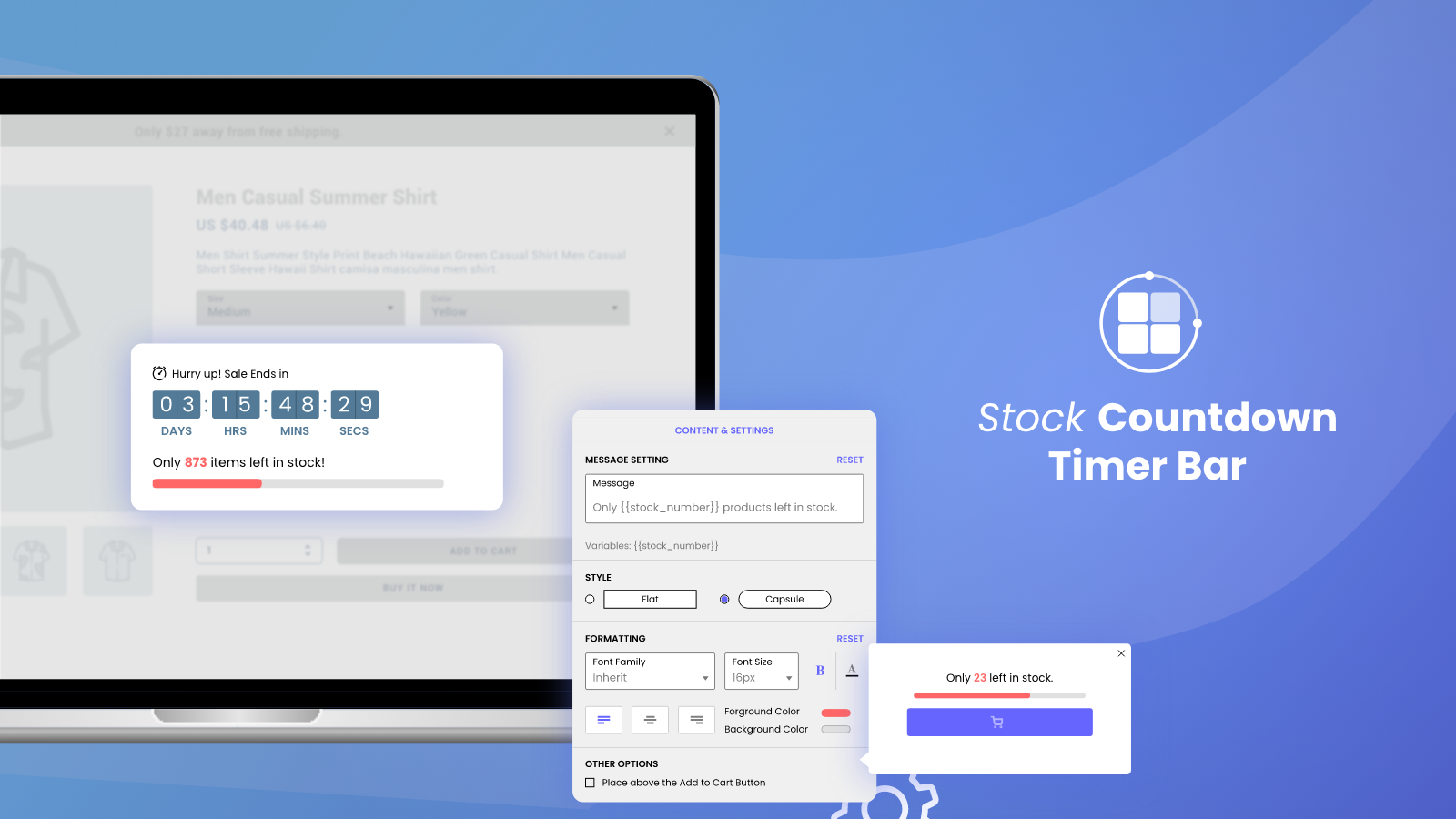
This app lets you add countdown timers and low stock counters to your product and cart pages to create urgency and FOMO. The sales countdown timer shows customers how much time they have left to buy, while the stock countdown displays remaining inventory to encourage faster purchasing decisions. Key features include customizable countdown timer bars that match your store's look and feel, low stock counters that establish social proof by showing items are selling fast, and cart countdown timers that motivate visitors to complete their purchase. Setup takes less than 30 seconds with easy customization options for the countdown bar appearance. -
#8. Cart Upsell—Slide Cart Drawer let you uplift revenue with unlock offers cart upsell & cross sell
Sale Max helps you increase revenue with its slide cart drawer and cart upsell features. This app replaces standard cart popups with a customizable slide cart that encourages customers to add more items through smart product recommendations and cross-selling. The drag-and-drop cart builder lets you design a slide cart drawer that matches your store's theme. You can add a free shipping progressive bar and countdown timer to reduce abandoned carts and create urgency. Customers can apply discount codes, add order notes, and estimate shipping rates directly from the cart sidebar without leaving their shopping experience. The app shows relevant product upsells based on what's already in the cart, helping you grow your average order value. You can also set up product bundle discounts in the side cart to improve profit margins. Sale Max turns your mini cart into a conversion tool that makes shopping easier while driving more sales through strategic upselling and cross-selling. -
#9. Show an automatic discount based on what payment method has been selected

 Scala Payment Method Discount helps you reduce payment fees and get paid faster by offering automatic discounts based on the customer's chosen payment method. This app encourages shoppers to use your preferred payment options like bank transfer, Pix, or instant payments, which means fewer chargebacks and lower processing costs for your store. Convert more cash on delivery orders to prepaid by incentivizing customers with discounts. Scala works seamlessly with over 200 payment methods including PayPal, Apple Pay, Google Pay, Klarna, Afterpay, iDEAL, Bancontact, SEPA direct debit, Sofort, Boleto, and many others. The app is compatible with any theme and Shopify plan, and can be set up in just 3 easy steps. Stop losing orders and start saving on payment fees with automatic payment method discounts.
 -
#10. Set Order Limits, Quantity Breaks on product, collection, cart, customer tag and checkout rules

 This app lets you create minimum and maximum order limits and quantity breaks for products, variants, collections, or your entire cart. Set purchase controls based on quantity, total value, or weight with fully customizable rules. Perfect for preventing fraud, managing bulk purchases, and controlling inventory. Target wholesale customers using customer tags and allow them to request quotations. Set MOQ limits and quantity breaks for specific products or collections. Configure purchase frequency limits for each customer and integrate checkout rules to enforce restrictions. Display clear error messages on cart and checkout pages when limits are reached. Customize alerts in multiple languages to match your store's needs. No coding required – the app is theme-friendly with quick setup. Get 24/7 support to ensure compatibility with your store and optimize your sales and inventory management operations.