
 News
News
 Shopify SEO
 Shopify development
Best alternatives for Progus Store Locator Map Shopify app in 2026 [Updated]

Progus Store Locator Map
Free plan available. Free trial available.
Find stores, dealers and products nearby. No API key required.
Compare with % app %| Name | Rate on Shopify | Price | Free trial | Key features |
|---|
-
#1. Add interactive dealer map & physical stockist location to any store page.

 TA MAPPY lets you add a store locator and interactive dealer map to your Shopify store. Add physical stockist locations individually or upload them in bulk using a CSV file. Display unlimited locations with OpenStreetMap or Google Maps. Customers can easily search and filter stores using tags. The app auto-detects nearby stores based on IP address and suggests directions. Customize your store locator page with various templates to match your brand appearance. Create a dealer form to build your network with automated emails. Track customer search records to gain location insights. Translate your map page for international customers.
 -
#2. Easily create a powerful, customizable, mobile-friendly store & dealer locator map.
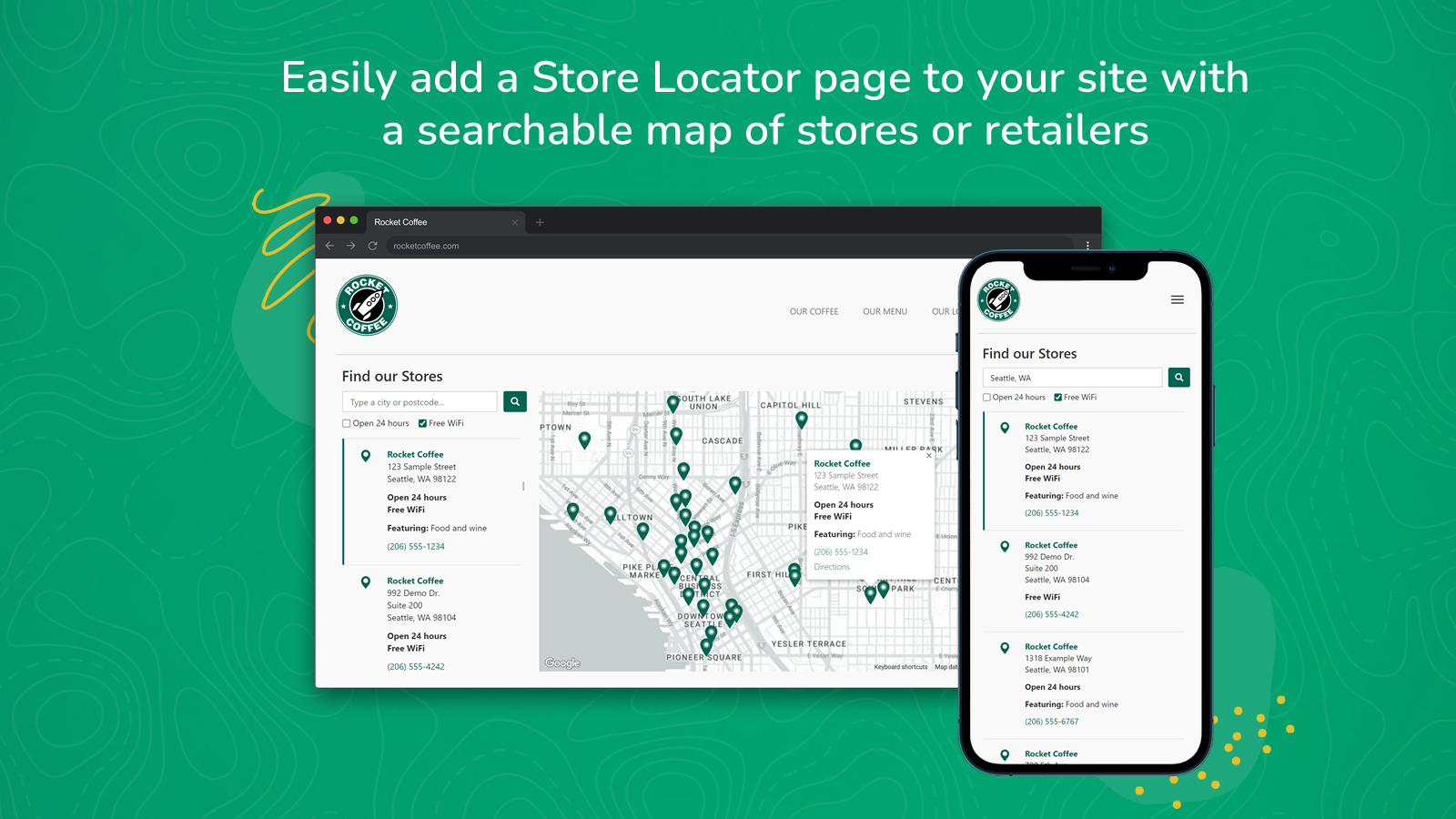
 Looking to add a professional store locator map to your Shopify site? Stockist helps you create a searchable, mobile-friendly map that showcases your retail locations, dealers, and stores. Customers can easily find nearby locations using geolocation, filter search results, and explore the map as they browse. Customize the look with your brand colors, adjust layouts, and manage locations through direct entry or spreadsheet imports. The built-in analytics reveal where customers are searching, helping you make informed decisions about your retail presence. Whether you have a few stores or hundreds of dealers, this store locator solution helps reduce customer support queries while building trust with your shoppers.
 -
#3. Easily add an interactive Google map of your shop or stockist/Supplier locations.

 This store locator app helps you add an interactive Google map to your Shopify store, making it easy for customers to find your shop locations or stockist suppliers. Add store locations one by one or upload 500+ locations in bulk using a simple CSV file. Customers can search by location, radius, or custom tags to find nearby stores and get directions. Customize the map design to match your store perfectly with custom images and pins. Use store tags to let customers filter locations by specific details. The app is available in 25+ languages with customizable translation options. Get 24/7 live support and schedule installation assistance whenever you need help setting up your store locator map.
 -
#4. Drive foot traffic by displaying all your physical locations on a responsive map.
This Google Maps store locator helps customers find your physical locations with ease. The app displays accurate store information including business hours and contact details directly on your website. Perfect for single or multiple locations, it features an adaptive map design that works smoothly on all devices. Customize map themes to match your brand and integrate Google Map embed functionality. Add a stockist store locator to show multiple stockists, manage precise location data for every store, and create an advanced location map system. The store locator map ensures users can locate your business quickly with essential details displayed right on a responsive store map. -
#5. Easily create a powerful store, dealer and stockist locator map.

 Add a fast, searchable store locator map to help customers find your stores, dealers, or stockists near them. This Google Maps location finder includes autocomplete search, map directions, and customizable templates with live preview. Import thousands of locations by CSV in minutes and organize stores in groups with custom fields. Built-in analytics show where shoppers are searching for your products. Customers can search by location, postcode, store name, or tags, with geolocation and real-time directions to bring them to your door. Bulk-assign groups, custom fields, and working hours to multiple stores at once. Perfect for multi-location brands and dealers looking to drive more in-store sales and reduce support emails.
 -
#6. Help customers find the nearest store in seconds using Google Maps, product search and SEO-optimize

 This Store Locator app helps you display all your physical stores, dealers, and distributors on a single page of your Shopify website. Using Google Maps, customers can quickly find the nearest store location with exact addresses, making their shopping experience simple and convenient. Add unlimited store locations through bulk upload with CSV files or spreadsheets. Customers can easily search for stores by location, postcode, store name, product name, or tags. Each location gets a detailed page where you can connect products, add meta tags, and include tracking codes for better SEO optimization. The app includes dealer registration forms, location contact forms, heat-maps, and language translation options. Choose from multiple page layouts and map styles, customize with your own CSS, and manage stores with bulk import and export features. Merchants worldwide trust this solution to help their customers find store locations in seconds.
 -
#7. Store Locator App | No API Key Required During Trial

 Storemapper helps customers find nearby stores, dealers, retailers, and distributors using a customizable store locator designed specifically for Shopify. Perfect for brands managing multiple locations, this app makes it easy to update store information and organize large location networks. The store locator includes bulk upload capabilities through CSV, Google Drive, and Google Business Profile sync. Customers can search faster with Google autocomplete and filters to find the right location quickly. Customize your map with custom CSS, layouts, and fields to match your brand. Display essential details like business hours, Google reviews, store information, and contact details. Built-in analytics let you track store searches and monitor location engagement to understand customer behavior better.
 -
#8. Show store locator and multi location inventory on product pages so shoppers find nearby stores

 GeoStock helps shoppers find nearby stores with live multi location inventory displayed right on your product pages. This store locator app shows stock by location so customers can see which stores have the products they want in stock. Add a store locator map widget or inventory widget to let customers browse all your locations within a set radius. The app uses IP geolocation to auto-detect the nearest store, making it easy for shoppers to find local inventory. Customize stock threshold colors per variant, hide out-of-stock items, and disable add-to-cart for locations with no inventory. You can add bin locations for warehouse teams, enable store pickup options, filter locations by country, and match your brand's fonts and colors. Perfect for retailers with multiple locations who want to show real-time inventory and help customers find products at their closest store.
 -
#9. Easily add a map of your locations so customers can find nearby stores or dealers
MAPMIGO helps you add a store locator map to your Shopify site so customers can easily find your physical stores or dealer network. Create a searchable map with all your locations where shoppers can discover nearby places to buy your products. Import your stores in bulk from Excel or Google Sheets, or add locations manually one by one. The app includes geolocation features that automatically show customers the closest stores based on their current position. Visitors can search for locations by store name, city, address, or postcode. Customize the map design, location list, and map markers to match your brand identity. No API key needed - setup is simple and straightforward. Add unlimited stores to your locator map. The app works reliably and integrates seamlessly with your store. Visit the demo store to see how it works. -
#10. Google Maps Store Locator: Add interactive dealer map & physical stockist location to any store page

 Way allows you to add an interactive, AI-powered store locator to your Shopify store with just one click. Show customers your physical stockist locations, dealership stores, and retail outlets using Google Maps integration to build trust and enable curbside pickup or DoorDash services. Add unlimited store locations with accurate addresses, phone numbers, and store images. The AI-powered bulk import feature lets you upload a CSV file to add multiple locations instantly. Fully customize the store locator map to match your brand - control colors, design, size, and appearance without needing an API key. Perfect for businesses with physical stores who want to help customers find their nearest location. The map works with any Shopify theme and installs in one click, making it easy to guide shoppers to your dealership or stockist locations.


